Remote support in one file
Your mum calls — her laptop won't start. You need to see her screen. One file, nothing to install, no account to create. You watch everything the whole time and can disconnect with one click.
This device can't run it. Email yourself this page's link, and open it on the computer that needs help.
Email yourself this linkOr just remember: flashdesk.org
This is a portable single file. You run it directly — nothing writes to your system, no registry entries, no startup service. Deleting the file removes it entirely.
See verified SHA-256 hash on the download page →
Windows will show a SmartScreen warning — this is normal for a new file.
Exactly what you'll see, and what to click →
This link goes to GitHub, where the file is published. That's expected.
The installer places FlashDesk in Program Files and adds a Start menu entry. It requires an administrator password. Use this if your organisation's IT policy requires installed software, or if your browser blocks the portable .exe.
Note: this file is served from flashdesk.org — your browser may warn you.
Verify the file before running it
Check the hash of the downloaded file matches the published value. If they differ, do not run the file.
SHA-256: [see /download/ for the current verified hash]
In PowerShell, run:
Get-FileHash .\FlashDesk.exe -Algorithm SHA256
Compare the output to the hash above — they must match exactly.
Only download this if you contacted us yourself.
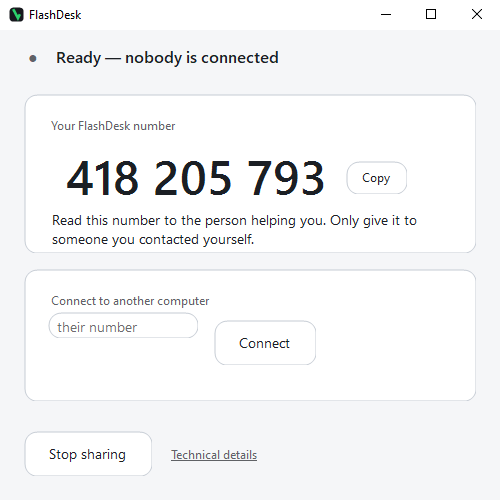 Your number — read this to your helper, not a password
One button ends the session
Your number — read this to your helper, not a password
One button ends the session
Built for one thing. No extras.
Four properties that separate FlashDesk from every other remote support tool.
No install required
One .exe file. Run it, get help, close it. Nothing is written to your system. Delete the file and FlashDesk is completely gone — no uninstaller needed, no registry entries left behind.
No account needed
No email address. No sign-up form. No licence key. You open the file, a number appears, you read it to someone — that is the entire setup.
You control it, always
You see everything your helper does while they are connected. A permanent amber band across the top of the window shows when anyone is connected. One click ends the session immediately.
Encrypted connection
The session traffic between your machine and your helper's is encrypted end-to-end. No third party can intercept what is shown on your screen during a FlashDesk session.
Three steps, read over the phone.
- 1 Download the file and open it. Nothing installs. A 9-digit number appears — like a temporary phone number for this computer. It is not a password.
- 2 Read that number to the person helping you.
- 3 Ask them to read you their number too, and check it matches the one on your screen when they connect. If it does not match, press Reject.
Full walkthrough — file access, multiple screens, what is logged →
Portable .exe vs Windows installer (.msi)
Both versions are identical once running. The difference is in how they get onto your machine.
| Property | FlashDesk.exe (portable) | FlashDesk-setup.msi (installer) |
|---|---|---|
| Admin password required | No | Yes — needed at install time |
| Writes to Program Files | No | Yes |
| Leaves files after deletion | No — delete the file and it is gone | Yes — use Settings › Apps to uninstall |
| Adds Start menu entry | No | Yes |
| Works if browser blocks the file | Depends on browser — use MSI if blocked | Yes — served from flashdesk.org as .msi |
| Behaviour once running | Identical — same code, same features, same security model | |
Full download page with SHA-256 hash, system requirements, and VirusTotal link →
The first time anyone connects, a human has to press Accept. There is no way around it, and no way to do it for them.
You watch everything
Your helper sees and controls your screen — while you watch everything they do.
Accept, the first time
The first connection always shows an Accept / Reject dialog — nothing gets in until you press it. If your connection briefly drops, reconnecting within 90 seconds doesn't ask again; that is the same session resuming, not a new one.
Can't be hidden
A band across the top of the window turns amber while anyone is connected. They cannot turn it off.
End it any time
One click, at any moment, ends the session immediately.
Nothing left behind
It does not run when you close it. Close the window and it is gone — nothing was installed.
Made by one person, for one purpose.
FlashDesk is made and run by Conor Honor, an independent computer specialist based in Kyiv. It has no investors, no advertising, no upsell, and no premium tier.
The goal is a single, honest remote support tool that a non-technical person can use without reading a manual, without creating an account, and without having to trust a large company with access to their screen. The source code is private, but every security claim on this site is documented in terms a developer can verify — the how-it-works and security pages cite specific behaviour, not marketing copy.
Write to support@flashdesk.org if you want to check who you are talking to before you download anything.
If someone phoned you out of the blue and told you to come here, hang up. Only download this if you contacted us yourself.
FlashDesk is made and run by Conor Honor, an independent computer specialist in Kyiv. Write to support@flashdesk.org if you want to check who you're talking to.
Ready to get help?
One portable file. Nothing installs. Works on Windows 10 and 11.
Download FlashDesk — freeAbout 70 MB · Portable — nothing installs · Windows will warn you — here's exactly what to expect
Need the Windows installer (.msi) instead? · Full download page with SHA-256 hash →